# Running Experiment
---
#### **Participant Handling**
Before the start of your experiment, you should inform your participants on the goals, terms and conditions of your research with an information letter ([ENG ](https://drive.google.com/file/d/1iD3GcnuXV3YTcEDOhLivQBlYbz13G8yF/view)/[NL ](https://drive.google.com/file/d/1LaBxx_vjEHgBxxJEHt-29aXCjZd9cwXo/view)). After this they should agree with participating in the research by signing the informed consent ([ENG ](https://drive.google.com/file/d/1ipxjLIJlHjZSnhsgF7igQJr96e9Wmkli/view)/[NL ](https://drive.google.com/file/d/1vk5ehkA2NZj4c3Sz5yUk00icxGnkKmHN/view)).
#### **Overview Data Flow**
For a general overview of the data flow when running an experiment see the following schematic. The next few paragraphs of this section will elaborate on the data flow.
#### **Transfer Experiment Files > Project Account**
In preparation of running your experiment, you have to transfer all needed experiment files to your research account beforehand.
##### **For EEG and Eye-tracking Experiments**
First, log into your research account (on any lab computer). Put all files that are needed for your experiment in the `EXP` folder on the server, found at `\\labssrv1\labs\[Projectaccountname]\EXP`.
[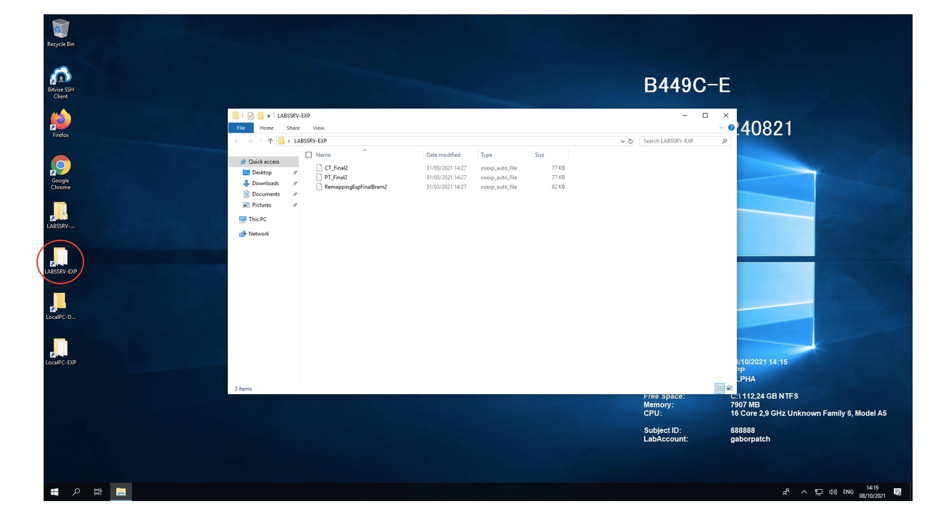](https://bblabs.fgb.vu.nl/uploads/images/gallery/2026-03/image.png)
##### **For Behavioural Experiments**
When running experiments in the behavioural cubicles, you have to create a new folder (e.g. "MyExperiment") within the `\\labssrv1\labs\[Projectaccountname]\EXP` folder. You place your experiment files in this new folder. If your project includes multiple experimental files (including images, textfiles or sound), place them together with the actual experiment inside of the "MyExperiment" folder.
Multiple separate experiments can be run sequently in the same run. For this, multiple folders are needed in `\\labssrv1\labs\[Projectaccountname]\EXP`. Folders will be automatically and sequentially opened during a session. This happens in alphabetical and numerical order. Thus, to create a specific play order you could for example use "01\_MyFirstExperiment" and "02\_MySecondExperiment" as folder names.
If you are planning on running experiments in the cubicles, please look at the [cubicle manual ](https://bblabs.fgb.vu.nl/books/brain-behaviour-lab/chapter/behavioural-cubicles "Behavioural Cubicles")for more detailed information about correctly setting up your project account and data management.
#### **Starting Your Experiment**
##### **For EEG and Eye-tracking Experiments**
Turn on all needed computers (Stimulus/EyeLink/BioSemi). Log into the stimulus computer with your research account. Every time you log in, all files from the `\\labssrv1\labs\[Projectaccountname]\EXP` folder will be copied to a local `EXP` folder. When running your experiment, it is important to use the version located in the `LocalPC-EXP` (desktop shortcut of local `EXP` folder).
Although the contents of `\\labssrv1\labs\[Projectaccountname]\EXP` and `LocalPC-EXP` should completely match after logging in, it is strongly advised to **NOT** run your experiment from the server. Any network problems can cause your experiment to crash, this will not pose a problem when running locally.
Furthermore, you should specify that your data should be stored in the `LocalPC-DATA` folder. If this is not possible, move the data there manually before logging off from the project account. When logging off, all files from the local DATA folder will be copied to the `LABSSRV1-DATA` folder on the server.
##### **For Behavioural Experiments**
See section [Behavioural Cubicles](https://bblabs.fgb.vu.nl/books/brain-behaviour-lab/chapter/behavioural-cubicles "Behavioural Cubicles").