# Pre Experiment

---

#### **Ethics in Research**

1. Check the privacy rules on [this <svg aria-hidden="true" class="" height="15" viewbox="0 0 100 100" width="15" xmlns="http://www.w3.org/2000/svg"><path d="M18.8,85.1h56l0,0c2.2,0,4-1.8,4-4v-32h-8v28h-48v-48h28v-8h-32l0,0c-2.2,0-4,1.8-4,4v56C14.8,83.3,16.6,85.1,18.8,85.1z" fill="currentColor"></path><polygon fill="currentColor" points="45.7,48.7 51.3,54.3 77.2,28.5 77.2,37.2 85.2,37.2 85.2,14.9 62.8,14.9 62.8,22.9 71.5,22.9"></polygon></svg>](https://vu.nl/en/employee/research-data-management-fbms/privacy-legal-and-security-concerns-fgb) website.
2. You should submit a data management plan to the Research and Policy Support (REPS) Team (<research.data.fgb@vu.nl>). You can find more information on [this <svg aria-hidden="true" class="" height="15" viewbox="0 0 100 100" width="15" xmlns="http://www.w3.org/2000/svg"><path d="M18.8,85.1h56l0,0c2.2,0,4-1.8,4-4v-32h-8v28h-48v-48h28v-8h-32l0,0c-2.2,0-4,1.8-4,4v56C14.8,83.3,16.6,85.1,18.8,85.1z" fill="currentColor"></path><polygon fill="currentColor" points="45.7,48.7 51.3,54.3 77.2,28.5 77.2,37.2 85.2,37.2 85.2,14.9 62.8,14.9 62.8,22.9 71.5,22.9"></polygon></svg>](https://vu.nl/en/employee/research-data-management-fbms) website.
3. Research has to comply with the code of ethics for research at the FGB (NETHICS), which can be found on [this <svg aria-hidden="true" class="" height="15" viewbox="0 0 100 100" width="15" xmlns="http://www.w3.org/2000/svg"><path d="M18.8,85.1h56l0,0c2.2,0,4-1.8,4-4v-32h-8v28h-48v-48h28v-8h-32l0,0c-2.2,0-4,1.8-4,4v56C14.8,83.3,16.6,85.1,18.8,85.1z" fill="currentColor"></path><polygon fill="currentColor" points="45.7,48.7 51.3,54.3 77.2,28.5 77.2,37.2 85.2,37.2 85.2,14.9 62.8,14.9 62.8,22.9 71.5,22.9"></polygon></svg>](https://vu.nl/en/employee/behavioural-and-movement-sciences-getting-started/the-scientific-and-ethical-review-board-vcwe) website.
4. With regards to ethical approval, an umbrella ethics application for standard cognitive experiments in the lab - including online experimenting and VR - has been [approved <svg aria-hidden="true" class="" height="15" viewbox="0 0 100 100" width="15" xmlns="http://www.w3.org/2000/svg"><path d="M18.8,85.1h56l0,0c2.2,0,4-1.8,4-4v-32h-8v28h-48v-48h28v-8h-32l0,0c-2.2,0-4,1.8-4,4v56C14.8,83.3,16.6,85.1,18.8,85.1z" fill="currentColor"></path><polygon fill="currentColor" points="45.7,48.7 51.3,54.3 77.2,28.5 77.2,37.2 85.2,37.2 85.2,14.9 62.8,14.9 62.8,22.9 71.5,22.9"></polygon></svg>](https://vunl.sharepoint.com/:b:/s/FGB-BV-TO3BBlabs/EYnCGng9hkBLryylRnMOBZQBP2Lx-OC3v70tkwFeXtvkbQ?e=6q76jO) by the Ethical Review Board (VCWE) in September 2021 and is valid for 5 years. If you are a researcher in the section Cognitive Psychology and your research does not deviate from [this protocol <svg aria-hidden="true" class="" height="15" viewbox="0 0 100 100" width="15" xmlns="http://www.w3.org/2000/svg"><path d="M18.8,85.1h56l0,0c2.2,0,4-1.8,4-4v-32h-8v28h-48v-48h28v-8h-32l0,0c-2.2,0-4,1.8-4,4v56C14.8,83.3,16.6,85.1,18.8,85.1z" fill="currentColor"></path><polygon fill="currentColor" points="45.7,48.7 51.3,54.3 77.2,28.5 77.2,37.2 85.2,37.2 85.2,14.9 62.8,14.9 62.8,22.9 71.5,22.9"></polygon></svg>](https://vunl.sharepoint.com/:b:/s/FGB-BV-TO3BBlabs/EVgr3sTVJ8FFmjtZkyTBsykB4GIWt5QF_fv9RmgJ6WLqlA?e=0kZoRh), you do not need to request separate approval. In this case, you can use the approved [consent form <svg aria-hidden="true" class="" height="15" viewbox="0 0 100 100" width="15" xmlns="http://www.w3.org/2000/svg"><path d="M18.8,85.1h56l0,0c2.2,0,4-1.8,4-4v-32h-8v28h-48v-48h28v-8h-32l0,0c-2.2,0-4,1.8-4,4v56C14.8,83.3,16.6,85.1,18.8,85.1z" fill="currentColor"></path><polygon fill="currentColor" points="45.7,48.7 51.3,54.3 77.2,28.5 77.2,37.2 85.2,37.2 85.2,14.9 62.8,14.9 62.8,22.9 71.5,22.9"></polygon></svg>](https://vunl.sharepoint.com/:w:/s/FGB-BV-TO3BBlabs/Ea-L_iYdm-tPvsJm68ohHn8Bv_GSOXsmjjVVkKDLN4UhxQ?e=rDjHqA) and [information letter <svg aria-hidden="true" class="" height="15" viewbox="0 0 100 100" width="15" xmlns="http://www.w3.org/2000/svg"><path d="M18.8,85.1h56l0,0c2.2,0,4-1.8,4-4v-32h-8v28h-48v-48h28v-8h-32l0,0c-2.2,0-4,1.8-4,4v56C14.8,83.3,16.6,85.1,18.8,85.1z" fill="currentColor"></path><polygon fill="currentColor" points="45.7,48.7 51.3,54.3 77.2,28.5 77.2,37.2 85.2,37.2 85.2,14.9 62.8,14.9 62.8,22.9 71.5,22.9"></polygon></svg>](https://vunl.sharepoint.com/:w:/s/FGB-BV-TO3BBlabs/EQ9opHzUVmtNhEWVV9TQansBqLrSMSiqRgh-L841BGdJ0Q?e=Mq0Ww1) templates and add study-specific information. With regards to the information letter, you can use [this document <svg aria-hidden="true" class="" height="15" viewbox="0 0 100 100" width="15" xmlns="http://www.w3.org/2000/svg"><path d="M18.8,85.1h56l0,0c2.2,0,4-1.8,4-4v-32h-8v28h-48v-48h28v-8h-32l0,0c-2.2,0-4,1.8-4,4v56C14.8,83.3,16.6,85.1,18.8,85.1z" fill="currentColor"></path><polygon fill="currentColor" points="45.7,48.7 51.3,54.3 77.2,28.5 77.2,37.2 85.2,37.2 85.2,14.9 62.8,14.9 62.8,22.9 71.5,22.9"></polygon></svg>](https://vunl.sharepoint.com/:b:/s/FGB-BV-TO3BBlabs/ETu9q5jQPB9Oruv4XEfF304BY3gmvoIBh7iv8xNWyUWRZw?e=un3GwW) to add method-specific text.
5. If you are not a researcher working in the section Cognitive Psychology and/or for any deviations from the standard protocol, you can apply for an amendment at the VCWE. You then upload this protocol and explain what you will add/do differently. In case your research deviates hugely you need to get your own research protocol approved by VCWE. To prepare a new ethics application, you can find participant-information-letter-template and informed-consent-templates and a GDPR checklist on [this website <svg aria-hidden="true" class="" height="15" viewbox="0 0 100 100" width="15" xmlns="http://www.w3.org/2000/svg"><path d="M18.8,85.1h56l0,0c2.2,0,4-1.8,4-4v-32h-8v28h-48v-48h28v-8h-32l0,0c-2.2,0-4,1.8-4,4v56C14.8,83.3,16.6,85.1,18.8,85.1z" fill="currentColor"></path><polygon fill="currentColor" points="45.7,48.7 51.3,54.3 77.2,28.5 77.2,37.2 85.2,37.2 85.2,14.9 62.8,14.9 62.8,22.9 71.5,22.9"></polygon></svg>](https://vu.nl/en/employee/behavioural-and-movement-sciences-getting-started/the-scientific-and-ethical-review-board-vcwe).


#### **Request a Project Account**

To run experiments in the lab and use the lab computers, you should request a project account. This can be requested by sending an email to the Lab Coordinator(<c.cengiz@vu.nl>) or to <bblabs.fgb@vu.nl>. Each new project requires a new account. This means that if you want to start a different project, **<span style="color: rgb(224, 62, 45);">you need to request a new project account</span>**.<span style="color: rgb(0, 0, 0);"> </span>This project account can be used by multiple people working on the same project. With this research account you can log into every computer at the VU Brain &amp; Behaviour lab. You can also log into different PCs at the same time. The steps for requesting an account:

1. Send an e-mail to the Lab Coordinator or <bblabs.fgb@vu.nl> that you would like to have a new project account.
2. You will receive a response mail with a link to a form for filling out information.
3. Once you filled in the form, send a response that you have filled the form in **along with a password of minimum 7 characters**.
4. You will receive a confirmation mail with your username/Short Project Name and your password. You can now use it to log into the PCs.

Once you have your account, check out the **Lab Help** folder that everyone has on their desktop by default. Most of the software necessary is also present by default.

<p class="callout info">If you need anything in particular that is not on there already, contact the Lab Coordinator or anyone else from the Lab Team. Do this in a timely manner! </p>

For more detailed information about (default) project accounts, check the page on [Project Accounts](https://bblabs.fgb.vu.nl/books/brain-behaviour-lab/page/project-accounts "Project Accounts").


#### **Lab Access**

If you do not have access to the lab on your VU employee card, then you can request this at the TO3 Helpdesk. The room number is B-659 (MF-builing, sixth floor). Opening hours of the TO3 Helpdesk are Monday-Thursday from 09:00 to 17:00 and on Friday from 09:00 to 16:00. Before you go there, discuss your access request with the [Lab Coordinator](https://bblabs.fgb.vu.nl/books/brain-behaviour-lab/page/people "People") since they need to approve it. Students cannot have lab access on their cards and need to request keycards for each booking (or the supervisor needs to request it for them via Labservant).

If at any time your access card is not working, try updating it by holding it against the lock at the front entrance of the lab. This may fix your problem. If the problem persists, visit the TO3 Helpdesk.

In the case of (student) research assistants, it is possible to request an employee access card through [this <svg aria-hidden="true" class="" height="15" viewbox="0 0 100 100" width="15" xmlns="http://www.w3.org/2000/svg"><path d="M18.8,85.1h56l0,0c2.2,0,4-1.8,4-4v-32h-8v28h-48v-48h28v-8h-32l0,0c-2.2,0-4,1.8-4,4v56C14.8,83.3,16.6,85.1,18.8,85.1z" fill="currentColor"></path><polygon fill="currentColor" points="45.7,48.7 51.3,54.3 77.2,28.5 77.2,37.2 85.2,37.2 85.2,14.9 62.8,14.9 62.8,22.9 71.5,22.9"></polygon></svg>](https://services.vu.nl/esc?id=sc_cat_item&sys_id=709e054c47d35d50bfa46d72e36d43d0) link.

##### **Access Outside Opening Hours** 

You will need to request additional access on your card and inform VU Security about when you would like to get access to the lab outside of the opening hours. The steps for requesting this access can be found in our [Guideline <svg aria-hidden="true" class="" height="15" viewbox="0 0 100 100" width="15" xmlns="http://www.w3.org/2000/svg"><path d="M18.8,85.1h56l0,0c2.2,0,4-1.8,4-4v-32h-8v28h-48v-48h28v-8h-32l0,0c-2.2,0-4,1.8-4,4v56C14.8,83.3,16.6,85.1,18.8,85.1z" fill="currentColor"></path><polygon fill="currentColor" points="45.7,48.7 51.3,54.3 77.2,28.5 77.2,37.2 85.2,37.2 85.2,14.9 62.8,14.9 62.8,22.9 71.5,22.9"></polygon></svg>](https://vunl.sharepoint.com/:b:/s/FGB-BV-TO3BBlabs/EZeDfI0gDyVBjdYdv9j59sYB4Nsv3St9X1k6SEjXtqwJnA?e=aO5LSB).

#### **Recruiting Participants**

Participants can be recruited via walk-ins or via the online [Sona system <svg aria-hidden="true" class="" height="15" viewbox="0 0 100 100" width="15" xmlns="http://www.w3.org/2000/svg"><path d="M18.8,85.1h56l0,0c2.2,0,4-1.8,4-4v-32h-8v28h-48v-48h28v-8h-32l0,0c-2.2,0-4,1.8-4,4v56C14.8,83.3,16.6,85.1,18.8,85.1z" fill="currentColor"></path><polygon fill="currentColor" points="45.7,48.7 51.3,54.3 77.2,28.5 77.2,37.2 85.2,37.2 85.2,14.9 62.8,14.9 62.8,22.9 71.5,22.9"></polygon></svg>](https://vu.sona-systems.com/). You can also place brochures of your experiment in the waiting room of the Brain &amp; Behaviour Lab (A-431) or on bulletin boards around VU Campus. Additionally, we also put links to studies in the [Ongoing Studies](https://bblabs.fgb.vu.nl/books/brain-behaviour-lab/page/ongoing-studies "Ongoing Studies") section of this website. Previously, there was the option to use Telegram for recruiting participants; this option has been discontinued!

##### **Sona** 

If you do not have a Sona-account yet, please contact <subjectpool.fgb@vu.nl>. After receiving a Sona-account, you can create a study on Sona with the available time slots and have people register for your research. Participants can apply for credits (1.5 per minute in the lab, or 1 per minute online) or for money (10 euros per hour). For more detailed information on participant handling please see [the following manual <svg aria-hidden="true" class="" height="15" viewbox="0 0 100 100" width="15" xmlns="http://www.w3.org/2000/svg"><path d="M18.8,85.1h56l0,0c2.2,0,4-1.8,4-4v-32h-8v28h-48v-48h28v-8h-32l0,0c-2.2,0-4,1.8-4,4v56C14.8,83.3,16.6,85.1,18.8,85.1z" fill="currentColor"></path><polygon fill="currentColor" points="45.7,48.7 51.3,54.3 77.2,28.5 77.2,37.2 85.2,37.2 85.2,14.9 62.8,14.9 62.8,22.9 71.5,22.9"></polygon></svg>](https://vunl.sharepoint.com/:b:/s/FGB-BV-TO3BBlabs/EUYLZtkk0y5Il3Kwne6q7NgBnoooIThKGaxem3qqIHOBEQ?e=44vvxq) (2024/2025.)

#### **Reserving Lab Spaces**

For making bookings and reservations of lab spaces, we make use of [Labservant <svg aria-hidden="true" class="" height="15" viewbox="0 0 100 100" width="15" xmlns="http://www.w3.org/2000/svg"><path d="M18.8,85.1h56l0,0c2.2,0,4-1.8,4-4v-32h-8v28h-48v-48h28v-8h-32l0,0c-2.2,0-4,1.8-4,4v56C14.8,83.3,16.6,85.1,18.8,85.1z" fill="currentColor"></path><polygon fill="currentColor" points="45.7,48.7 51.3,54.3 77.2,28.5 77.2,37.2 85.2,37.2 85.2,14.9 62.8,14.9 62.8,22.9 71.5,22.9"></polygon></svg>](https://labservant.vu.nl/equipment/lending-desk/landing-page). Anyone from the FGB Department can make use of Labservant. It might be somewhat difficult to navigate so we have step-by-steps instructions on how to make a booking:

<p class="callout success">Check [this document <svg aria-hidden="true" class="" height="15" viewbox="0 0 100 100" width="15" xmlns="http://www.w3.org/2000/svg"><path d="M18.8,85.1h56l0,0c2.2,0,4-1.8,4-4v-32h-8v28h-48v-48h28v-8h-32l0,0c-2.2,0-4,1.8-4,4v56C14.8,83.3,16.6,85.1,18.8,85.1z" fill="currentColor"></path><polygon fill="currentColor" points="45.7,48.7 51.3,54.3 77.2,28.5 77.2,37.2 85.2,37.2 85.2,14.9 62.8,14.9 62.8,22.9 71.5,22.9"></polygon></svg>](https://vunl.sharepoint.com/:b:/s/FGB-BV-TO3BBlabs/Ecvh0velWtFMvDR93tPpnucBZG2KqEwOKbq7UOOg84e0KA?e=N4lPJ8) for the most up-to-date booking instructions and guidelines. </p>

1. Please open your browser, navigate to [Labservant <svg aria-hidden="true" class="" height="15" viewbox="0 0 100 100" width="15" xmlns="http://www.w3.org/2000/svg"><path d="M18.8,85.1h56l0,0c2.2,0,4-1.8,4-4v-32h-8v28h-48v-48h28v-8h-32l0,0c-2.2,0-4,1.8-4,4v56C14.8,83.3,16.6,85.1,18.8,85.1z" fill="currentColor"></path><polygon fill="currentColor" points="45.7,48.7 51.3,54.3 77.2,28.5 77.2,37.2 85.2,37.2 85.2,14.9 62.8,14.9 62.8,22.9 71.5,22.9"></polygon></svg>](https://labservant.vu.nl/equipment/lending-desk/landing-page), and log in using your VU-ID credentials. Navigate to Lending Desk.

<div class="ImageZoom with-border" data-v-f17c6258="" id="bkmrk--1"></div>2. In the Lending Desk, click on ‘**+Create new booking**’ in the right lower corner.  
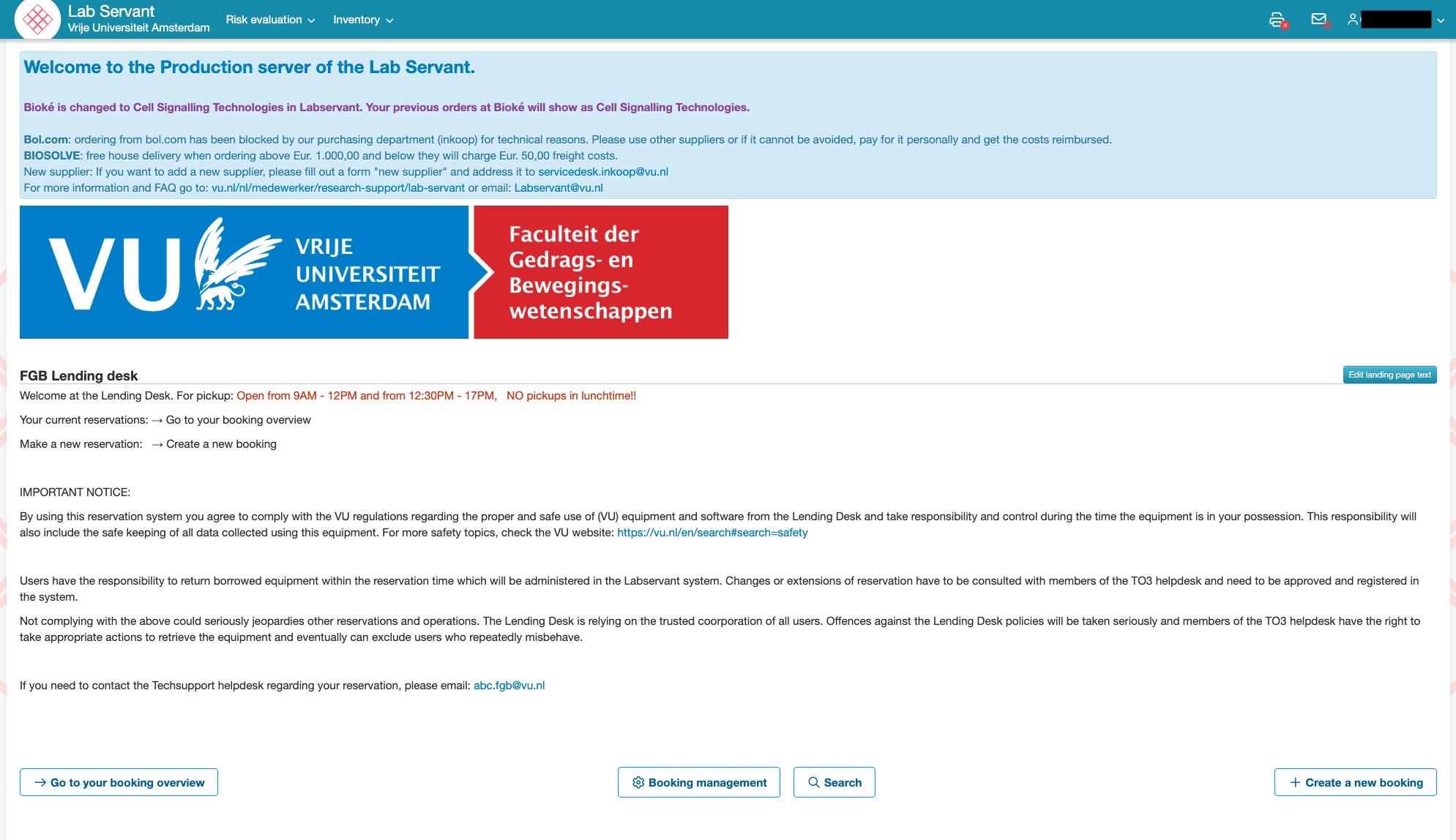
     ![Labservant1.png](https://bblabs.fgb.vu.nl/uploads/images/gallery/2026-06/labservant1.png)

<div class="ImageZoom with-border" data-v-f17c6258="" id="bkmrk--2"></div>3. Search for the room you need: 
    - If you write '**Brain**' as a search term, you will see all the **keycards AND rooms** of the Lab.
    - You can also just look up a specific room if you know which one you need.
    - Multipurpose/VR labs can be found under the search term: 'Multicubicle'
    - EEG labs can be found under the search term: 'B447'
    - Eyelink labs can be found under the search term: 'B449'  
        \*note that you can make use of both EEG/Eyelink in the rooms of B447 &amp; B449

<div class="ImageZoom with-border" data-v-f17c6258="" id="bkmrk--3">![Labservant2.png](https://bblabs.fgb.vu.nl/uploads/images/gallery/2026-06/labservant2.png)</div><div class="ImageZoom with-border" data-v-f17c6258="" id="bkmrk--4"></div>All rooms start with "EQ018... MF-...." (e.g., "EQ018159 MF-B447A EEG + Eyelink") and all keycards starts with "EQ017... Keycard MF-...." (e.g., "EQ017671 Keycard MF-B447 EEG-01").

<p class="callout warning">Any room/keycard that does NOT start with "EQ01...." is old and invalid. Please pay attention to not select any of these!</p>

<div class="ImageZoom with-border" data-v-f17c6258="" id="bkmrk--5"></div>4. Select the room, adjust the date and time and provide information of your booking. Make sure to select and fill out both the start and end times separately. In order to see your booking and availabilities you must move to your desired date manually using the arrows in black.
5. Never make a booking spanning multiple days. If you want to make a booking for the same space and time period for consecutive days, then select "Recurrence: daily" under "Recurrence" period. You can also do this weekly, however the booking slots cannot differ and, generally, you may not make bookings of more than 2 weeks in advance unless otherwise discussed with the Lab Coordinator.
6. Press submit &gt; you will receive a mail if your booking has been approved or declined. If declined, you can read in the mail why it has been declined.

<div class="ImageZoom with-border" data-v-f17c6258="" id="bkmrk--6"></div><p class="callout warning">When booking a lab space, check whether you are booking the space/room and not (just) the Keycard for the room. If you only select the Keycard, the room will NOT be reserved!</p>

##### **Cancellation of Booking**

Go to the home page &gt; click on the shortcut to the lending desk &gt; click on 'go to your booking overview' &gt; click on the booking you want to delete (the text becomes bold, the booking is selected) &gt; click on the 'edit' button in the bottom right corner &gt; click on the 'delete' button in the bottom right corner.

<div class="ImageZoom with-border" data-v-f17c6258="" id="bkmrk--8"></div>